
Task management tools help independent consultants stay organized, prioritize tasks, and ensure that client deliverables are met on time. These tools help consultants break down large projects into manageable tasks, assign due dates, track progress, and stay on top of their workload. For consultants managing multiple clients or projects simultaneously, task management tools provide a simple way to monitor deadlines and keep tasks organized across different workflows.
If you would like to suggest a tool to add to this resource, please send us your recommendation.
1. Todoist
- Website: www.todoist.com
- Form of tool: Web-based platform, desktop software, and mobile app
- Cost: Free plan; Premium plan starts at $4/month per user
- Geographic coverage: Global
Description and Features:
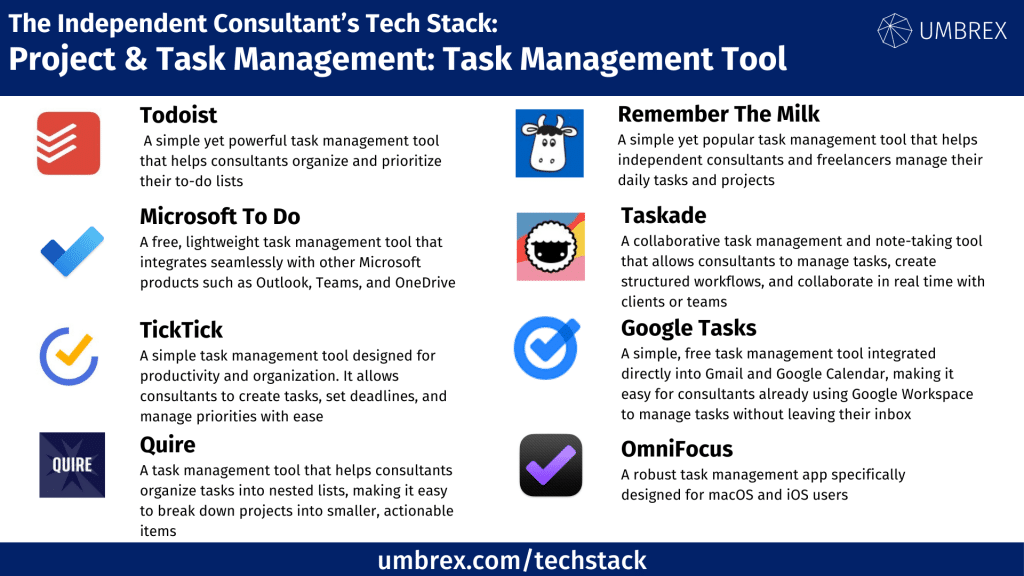
Todoist is a simple yet powerful task management tool that helps consultants organize and prioritize their to-do lists. It allows users to break projects into tasks and sub-tasks, assign due dates, and set reminders. Todoist’s intuitive design makes it easy for consultants to categorize tasks by client or project, ensuring nothing slips through the cracks. With integrations into popular tools like Google Calendar and Slack, Todoist fits seamlessly into an independent consultant’s workflow.
Key features:
- Task creation with deadlines and priority levels
- Task labels and filters for organization
- Recurring tasks and reminders
- Integration with Google Calendar, Slack, and other apps
Pros and Cons for Independent Consultants:
Pros:
- Simple and easy-to-use interface
- Great for managing tasks across multiple projects and clients
- Affordable pricing with a robust free plan
Cons:
- Limited advanced project management features
- Lacks built-in time tracking and reporting features
2. Microsoft To Do
- Website: www.microsoft.com/todo
- Form of tool: Web-based platform, desktop software, and mobile app
- Cost: Free
- Geographic coverage: Global
Description and Features:
Microsoft To Do is a free, lightweight task management tool that integrates seamlessly with other Microsoft products such as Outlook, Teams, and OneDrive. It allows consultants to create tasks, set deadlines, and organize work with lists and sub-tasks. Microsoft To Do’s deep integration into the Microsoft ecosystem makes it a great option for consultants already using other Microsoft tools, helping them stay organized within a familiar interface.
Key features:
- Task creation with due dates and reminders
- Task lists and sub-task organization
- Integration with Outlook and Microsoft Teams
- Syncs across all devices
Pros and Cons for Independent Consultants:
Pros:
- Completely free with no hidden costs
- Excellent integration with other Microsoft tools
- Simple, no-frills task management
Cons:
- Limited in features compared to paid tools
- Best suited for consultants who already use Microsoft’s ecosystem
3. Any.do
- Website: www.any.do
- Form of tool: Web-based platform, desktop software, and mobile app
- Cost: Free plan; Premium plan starts at $5.99/month per user
- Geographic coverage: Global
Description and Features:
Any.do is a task management tool designed to simplify daily to-do lists and larger project tasks. It provides task lists, calendars, and reminders, helping consultants manage multiple projects simultaneously. The tool’s unique feature, the “Moment,” offers a daily task overview to keep users focused on the most critical tasks of the day. Any.do integrates with tools like Google Calendar, enabling consultants to manage tasks and appointments in one place.
Key features:
- Task lists, calendars, and reminders
- Daily “Moment” feature to prioritize tasks
- Integration with Google Calendar, Slack, and Evernote
- Recurring tasks and subtasks
Pros and Cons for Independent Consultants:
Pros:
- Simple interface with an easy learning curve
- Daily focus feature helps prioritize critical tasks
- Affordable pricing for solo consultants
Cons:
- Limited advanced task tracking features
- Lacks reporting and analytics
4. TickTick
- Website: www.ticktick.com
- Form of tool: Web-based platform, desktop software, and mobile app
- Cost: Free plan; Premium plan starts at $2.99/month per user
- Geographic coverage: Global
Description and Features:
TickTick is a simple task management tool designed for productivity and organization. It allows consultants to create tasks, set deadlines, and manage priorities with ease. TickTick’s intuitive design also includes a built-in Pomodoro timer and a habit tracker, making it ideal for consultants who want to stay productive while managing multiple projects. The tool integrates with popular calendar apps, offering consultants a central place to organize both their personal and professional tasks.
Key features:
- Task creation with deadlines and priorities
- Built-in Pomodoro timer for productivity
- Habit tracking feature
- Integration with Google Calendar and Outlook
Pros and Cons for Independent Consultants:
Pros:
- Very affordable with a rich feature set for task management
- Built-in productivity tools like the Pomodoro timer
- Great for organizing both work and personal tasks
Cons:
- Limited collaboration features for teams
- Lacks advanced project management features
5. Remember The Milk
- Website: www.rememberthemilk.com
- Form of tool: Web-based platform, desktop software, and mobile app
- Cost: Free plan available; paid plan (Pro) starts at $39.99/year
- Geographic coverage: Global
Description and Features:
Remember The Milk is a simple yet popular task management tool that helps independent consultants and freelancers manage their daily tasks and projects. With features like smart lists, reminders, due dates, and task prioritization, it makes organizing tasks easy and efficient. The tool allows for integration with Google Calendar, Gmail, and other apps, making it a great option for consultants who need lightweight but effective task management.
Key features:
- Task creation and management with priorities, due dates, and tags
- Smart lists to filter and organize tasks
- Reminder alerts via email, SMS, or push notifications
- Integration with Gmail, Google Calendar, and Evernote
Pros and Cons for Independent Consultants:
Pros:
- Simple and intuitive to use, even for non-technical users
- Smart lists and reminders help consultants stay on top of tasks
- Affordable pricing for individuals
Cons:
- Lacks more advanced project management features
- The free version is limited in terms of integrations and features
6. OmniFocus
- Website: www.omnifocus.com
- Form of tool: Desktop software and mobile app (macOS and iOS only)
- Cost: $49.99 one-time purchase for Standard; $99.99 for Pro version
- Geographic coverage: Global
Description and Features:
OmniFocus is a robust task management app specifically designed for macOS and iOS users. It offers powerful task management features, including task hierarchies, tags, contexts, and smart folders to organize tasks based on priority or area of focus. OmniFocus is particularly useful for consultants managing complex projects with many moving parts, as it allows users to break down tasks into granular steps and organize them based on context or priority.
Key features:
- Task hierarchies, contexts, and tags for detailed task organization
- Customizable views and perspectives
- Smart folders and filtering for task prioritization
- Syncing across macOS and iOS devices
Pros and Cons For independent Consultants:
Pros:
- Ideal for consultants managing complex task lists
- Extensive customization for task views and filters
- Syncs across Apple devices seamlessly
Cons:
- Only available for macOS and iOS users
- Higher cost compared to simpler task management apps
7. Taskade
- Website: www.taskade.com
- Form of tool: Web-based platform and mobile app
- Cost: Free plan; paid plans start at $9/month per user
- Geographic coverage: Global
Description and Features:
Taskade is a collaborative task management and note-taking tool that allows consultants to manage tasks, create structured workflows, and collaborate in real time with clients or teams. It offers a combination of task management, brainstorming, and project planning, making it a flexible solution for both individual and team projects. With multiple task views (list, board, calendar), Taskade is great for consultants who need an all-in-one tool for managing tasks and collaborating with others.
Key features:
- Task lists, brainstorming tools, and project collaboration
- Multiple views, including list, board, and calendar
- Real-time collaboration with team members or clients
- Integrations with Google Drive, Slack, and more
Pros and Cons for Independent Consultants:
Pros:
- Combines task management with collaborative features
- Flexible views and customization options
- Great for consultants working on collaborative projects
Cons:
- Taskade may overlap with workflow management tools, given its collaborative features
- The free version has limited functionality
8. Google Tasks
- Website: www.tasks.google.com
- Form of tool: Web-based platform and mobile app (integrated with Gmail and Google Calendar)
- Cost: Free
- Geographic coverage: Global
Description and Features:
Google Tasks is a simple, free task management tool integrated directly into Gmail and Google Calendar, making it easy for consultants already using Google Workspace to manage tasks without leaving their inbox. Google Tasks allows users to create, prioritize, and organize tasks into lists, and it syncs across devices to keep track of to-dos from anywhere. Though it is basic compared to more advanced tools, its integration into the Google ecosystem makes it a convenient option for consultants looking for lightweight task management.
Key features:
- Create, organize, and prioritize tasks with due dates
- Syncs with Gmail and Google Calendar
- Sub-tasks for breaking down larger projects
- Mobile app for managing tasks on the go
Pros and Cons for Independent Consultants:
Pros:
- Simple and integrated directly into Google Workspace
- Free and easy to use for basic task management
- Syncs with Google Calendar for task scheduling
Cons:
- Lacks advanced task management features like tagging or time tracking
- Limited functionality compared to more robust task management tools
9. Quire
- Website: www.quire.io
- Form of tool: Web-based platform and mobile app
- Cost: Free plan available; paid plans start at $8.50/month per user
- Geographic coverage: Global
Description and Features:
Quire is a visual task management tool that helps consultants organize tasks into nested lists, making it easy to break down projects into smaller, actionable items. It offers multiple views, including kanban boards and timelines, allowing consultants to manage their projects visually and track progress in real time. Quire’s simple yet powerful interface makes it ideal for consultants who need to manage tasks across multiple projects while collaborating with clients or teams.
Key features:
- Nested task lists for breaking down complex projects
- Kanban boards and timeline views for visual project tracking
- Task collaboration with comments and attachments
- Integration with Google Drive, Slack, and more
Pros and Cons for Independent Consultants:
Pros:
- Intuitive, visual task management with nested lists
- Multiple views for managing different types of projects
- Free plan with ample features for individual users
Cons:
- Lacks some advanced features like time tracking or invoicing
- May require a learning curve for users unfamiliar with nested task structures