
Content Management Systems (CMS) enable independent consultants and boutique firms to create, manage, and organize website content with ease. These platforms allow users to update and publish content without needing advanced coding skills, making it simple to maintain a dynamic online presence. With features like customizable themes, plugins, and design options, CMS platforms help consultants tailor their websites to fit their brand and business needs.
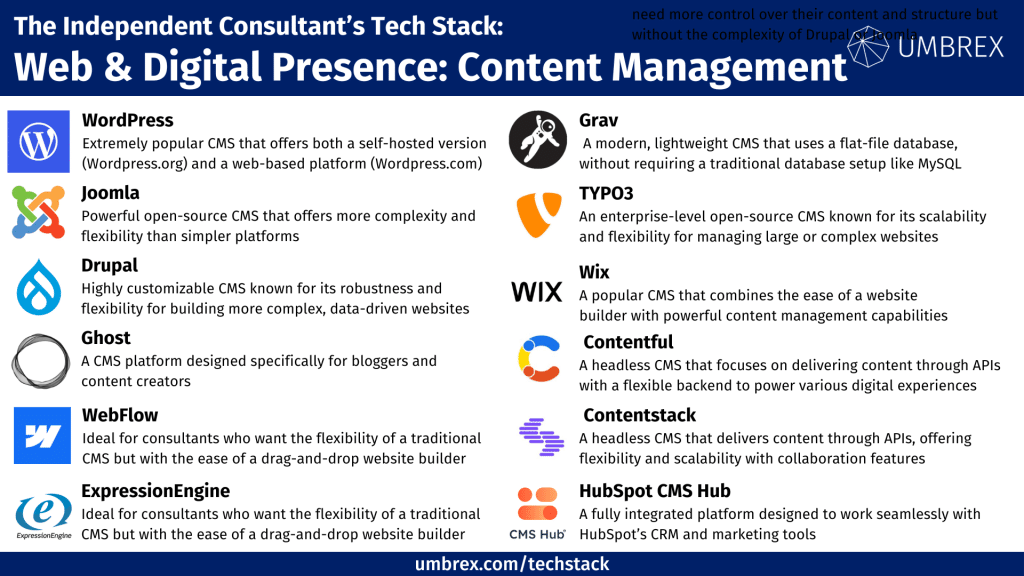
If you would like to suggest a tool to add to this resource, please send us your recommendation.
1. WordPress
- Websites: www.wordpress.org, www.wordpress.com
- Form of Tool:
WordPress.org: Downloadable software (self-hosted)
WordPress.com: Web-based platform (hosted)
- Cost:
WordPress.org: Free to download; additional costs for hosting, premium themes, and plugins
WordPress.com: Free plan available; paid plans start at $4/month
Geographic Coverage: Global
Description and Features:
WordPress offers two versions to suit different needs: WordPress.org, which provides complete control over the website’s hosting and design, and WordPress.com, which offers a more streamlined, hosted experience. Both versions share a powerful core CMS with customizable themes, plugins, and a user-friendly interface, making them ideal for consultants who need a flexible and scalable website solution. While WordPress.org requires users to manage their own hosting and maintenance, WordPress.com handles these aspects, providing a simplified setup process with varying levels of customization depending on the chosen plan.
Common Features:
Thousands of themes and plugins for customization
Strong SEO capabilities and analytics tools
Easy integration with e-commerce solutions like WooCommerce
Support for blogging, portfolios, and business websites
WordPress.org Specific:
Full control over website design, code, and functionality
Ideal for advanced users needing custom development
WordPress.com Specific:
Hosting, backups, and security managed by the platform
Built-in analytics and a more hands-off experience for users
Pros for Independent Consultants:
Customization: Highly customizable and scalable, suitable for any business need, with access to a large library of themes and plugins.
Flexibility: Users can choose between the fully managed experience of WordPress.com or the self-hosted freedom of WordPress.org.
Community Support: Large community of developers and extensive online resources for troubleshooting and learning.
Cons for Independent Consultants:
WordPress.org: Requires self-hosting, adding costs for domain and hosting services, with a learning curve for beginners. Maintenance, including backups and updates, must be handled manually.
WordPress.com: Less control over customization and functionality, especially on lower-tier plans. Ads are displayed on free and lower-tier plans unless upgraded, and e-commerce and advanced features require higher-priced plans.
2. Joomla
Website: www.joomla.org
Form of Tool: Downloadable software (self-hosted)
Cost: Free; additional costs for hosting, premium extensions, and templates
Geographic Coverage: Global
Description and Features:
Joomla is another powerful open-source CMS that offers more complexity and flexibility than simpler platforms. It’s well-suited for consultants who need more control over their website’s structure and want to build more complex sites with varied content management needs.
Key Features:
Robust content management system with advanced user management
Extensive library of extensions for added functionality
Multilingual support built into the core
Strong security features
Pros for Independent Consultants:
Flexible and powerful for creating complex websites
Built-in SEO tools and multilingual capabilities
Strong community support
Cons for Independent Consultants:
More complex than some CMS platforms
Smaller library of themes and extensions compared to WordPress
3. Drupal
Website: www.drupal.org
Form of Tool: Downloadable software (self-hosted)
Cost: Free; additional costs for hosting, premium modules, and themes
Geographic Coverage: Global
Description and Features:
Drupal is a highly customizable CMS platform known for its robustness and flexibility, making it ideal for consultants building more complex, data-driven websites. While it has a steeper learning curve, Drupal is highly secure and offers extensive options for developers and advanced users.
Key Features:
Custom content types and fields for highly detailed content structures
Advanced user role and permission management
Modular design for adding features as needed
High security and scalability
Pros for Independent Consultants:
Excellent for large, complex sites
Strong community support and security features
Customizable down to the smallest details
Cons for Independent Consultants:
Steeper learning curve for beginners
Requires more technical expertise
4. Ghost
Website: www.ghost.org
Form of Tool: Web-based platform or self-hosted
Cost: Paid plans start at $9/month (hosted version); free to download for self-hosting
Geographic Coverage: Global
Description and Features:
Ghost is a CMS platform designed specifically for bloggers and content creators. It offers a minimalist, distraction-free writing experience and is optimized for speed and SEO. It’s ideal for consultants focused on thought leadership, content marketing, and blogging.
Key Features:
Clean, minimalist interface for writing and publishing content
Fast, SEO-optimized platform
Membership and subscription management for monetizing content
Customizable themes and built-in analytics
Pros for Independent Consultants:
Easy to use and perfect for content-focused websites
Excellent performance and SEO features
Built-in tools for membership and monetization
Cons for Independent Consultants:
Limited in terms of extensibility compared to other CMS platforms
Less suitable for complex websites with varied content types
5. Webflow CMS
Website: www.webflow.com/cms
Form of Tool: Web-based platform
Cost: CMS plans start at $16/month
Geographic Coverage: Global
Description and Features:
Webflow CMS is part of the Webflow website builder, offering a visual, code-free experience for creating custom websites. It’s ideal for consultants who want the flexibility of a traditional CMS but with the ease of a drag-and-drop website builder. Webflow is particularly strong for consultants who need highly customized designs.
Key Features:
Visual editor with full design control
CMS features for blogs, portfolios, and dynamic content
Built-in hosting and SSL
Responsive design with SEO optimization
Pros for Independent Consultants:
Combines the ease of a website builder with CMS functionality
Great for creating custom, visually appealing sites
Easy to manage dynamic content
Cons for Independent Consultants:
Higher pricing compared to some other CMS options
Limited to Webflow’s hosting
6. ExpressionEngine
Website: www.expressionengine.com
Form of Tool: Downloadable software (self-hosted)
Cost: Free; paid Pro version starts at $199/year
Geographic Coverage: Global
Description and Features:
ExpressionEngine is a flexible and scalable CMS ideal for consultants who need more control over their content and structure but without the complexity of Drupal or Joomla. It offers strong security, a user-friendly interface, and the ability to manage complex content types.
Key Features:
Flexible content structure and publishing workflow
Built-in SEO tools and analytics
Strong security features and user management
Extensible with plugins and add-ons
Pros for Independent Consultants:
Flexible and powerful, suitable for a variety of content types
Secure platform with advanced user permissions
Easy to scale and manage complex sites
Cons for Independent Consultants:
Learning curve for non-technical users
Limited themes and plugins compared to other CMS platforms
7. Grav
Website: www.getgrav.org
Form of Tool: Downloadable software (self-hosted)
Cost: Free; additional costs for hosting and premium themes
Geographic Coverage: Global
Description and Features:
Grav is a modern, lightweight CMS that uses a flat-file database, meaning it doesn’t require a traditional database setup like MySQL. This makes it a fast, simple option for consultants who want to build websites quickly without sacrificing customization or performance.
Key Features:
Flat-file architecture for fast performance
Easy to set up and manage
Modular system for adding features
SEO-friendly and mobile-optimized
Pros for Independent Consultants:
Lightweight and fast, no need for a traditional database
Simple to set up with flexible customization options
Free and open-source
Cons for Independent Consultants:
Not as many plugins or themes as more established CMS platforms
Requires some technical knowledge to set up
8. TYPO3
Website: www.typo3.org
Form of Tool: Downloadable software (self-hosted)
Cost: Free; additional costs for hosting, themes, and extensions
Geographic Coverage: Global
Description and Features:
TYPO3 is an enterprise-level open-source CMS known for its scalability and flexibility. It’s a good fit for consultants managing large or complex websites that require extensive customization. TYPO3 is feature-rich and well-suited for consultants who need to handle multiple websites or languages within a single platform.
Key Features:
Multi-site and multi-language support
Advanced user management and permissions
Flexible and extensible with plugins and modules
Strong security and performance features
Pros for Independent Consultants:
Ideal for large, complex websites
Extensive multi-site and multi-language support
Robust security and scalability
Cons for Independent Consultants:
Steep learning curve
Requires significant technical expertise
9. Wix
Website: www.wix.com
Form of Tool: Web-based platform
Cost: Free plan available; paid plans start at $14/month
Geographic Coverage: Global
Description and Features:
Wix is a popular CMS that combines the ease of a website builder with powerful content management capabilities. It provides a user-friendly drag-and-drop editor and a variety of templates, making it suitable for consultants who want to quickly create and manage professional-looking websites without needing coding skills.
Key Features:
Drag-and-drop website editor with customizable templates
Built-in blogging and e-commerce features
SEO tools and mobile-optimized designs
App market for additional functionality
Pros for Independent Consultants:
Easy to use with minimal technical skills required
Wide selection of templates for different industries
Free plan available for testing
Cons for Independent Consultants:
Ads are displayed on the free plan
Higher costs for advanced features and premium plans
10. Contentful
Website: www.contentful.com
Form of Tool: Web-based platform (headless CMS)
Cost: Free tier available; paid plans start at $300/month for advanced features
Geographic Coverage: Global
Description and Features:
Contentful is a headless CMS that focuses on delivering content through APIs, making it ideal for consultants who need a flexible backend to power various digital experiences, such as websites, apps, or digital displays. It separates content management from presentation, allowing more control over how content is displayed.
Key Features:
API-first approach for delivering content to multiple platforms
Rich text editor for easy content creation
Integration with various tools like Gatsby, Next.js, and more
Powerful content modeling and organization features
Pros for Independent Consultants:
Great for projects that require content delivery across multiple channels
Highly flexible for custom web development needs
Allows for seamless content updates without altering the front-end design
Cons for Independent Consultants:
Higher starting cost for paid plans
Requires technical knowledge for setup and integration
11. Contentstack
Website: www.contentstack.com
Form of Tool: Web-based platform (headless CMS)
Cost: Custom pricing based on enterprise needs; free tier available for small projects
Geographic Coverage: Global
Description and Features:
Contentstack is a headless CMS designed for delivering content through APIs, offering flexibility and scalability. It is known for its user-friendly interface and collaboration features, making it a great choice for consultants working with teams or managing complex content projects.
Key Features:
API-driven content management
Built-in collaboration tools for teams
Customizable content models and workflows
Supports omnichannel content delivery
Pros for Independent Consultants:
Excellent for managing content across different platforms and devices
User-friendly interface and robust support for developers
Scalable, suitable for projects that may grow over time
Cons for Independent Consultants:
Can be costly for small teams or solo consultants
Requires technical skills for API integrations
12. HubSpot CMS Hub
Website: www.hubspot.com/products/cms
Form of Tool: Web-based platform
Cost: Plans start at $25/month
Geographic Coverage: Global
Description and Features:
HubSpot CMS Hub is a fully integrated platform designed to work seamlessly with HubSpot’s CRM and marketing tools. It’s ideal for consultants who want a CMS that integrates directly with lead generation, email marketing, and analytics, making it easier to manage content and client interactions from a single platform.
Key Features:
Drag-and-drop editor with customizable themes
Integrated SEO and A/B testing tools
CRM integration for managing leads and contacts
Built-in analytics and performance tracking
Pros for Independent Consultants:
All-in-one solution for content, marketing, and CRM
Easy to create personalized and dynamic content
Great support and resources for users
Cons for Independent Consultants:
Higher starting cost compared to some other CMS options
Less flexibility in customization compared to open-source solutions like WordPress
13. Kontent.ai
Website: www.kontent.ai
Form of Tool: Web-based platform (headless CMS)
Cost: Custom pricing based on project needs; free trial available
Geographic Coverage: Global
Description and Features:
Kontent.ai is a cloud-based headless CMS that offers a highly flexible way to manage content for websites, apps, and other digital experiences. It focuses on creating structured content that can be delivered to various channels, making it ideal for consultants working on multi-platform projects.
Key Features:
API-first content management for omnichannel delivery
Customizable content models and workflows
Collaboration tools for managing content creation with teams
Advanced personalization and localization capabilities
Pros for Independent Consultants:
Ideal for projects that require content to be distributed across multiple channels
Strong collaboration tools for working with teams or clients
Advanced features for content personalization and localization
Cons for Independent Consultants:
Pricing can be a barrier for smaller projects
Requires technical knowledge for initial setup and API integration