
Kanban board tools are ideal for independent consultants who need a visual way to manage tasks and track project progress. These tools allow consultants to organize tasks into boards, which are then divided into columns that represent different stages of the workflow, such as “To Do,” “In Progress,” and “Completed.” Kanban boards provide flexibility, making it easy to move tasks between stages and adjust project priorities as needed. These tools are particularly useful for consultants managing multiple clients or projects with dynamic, ongoing tasks that require continuous updates.
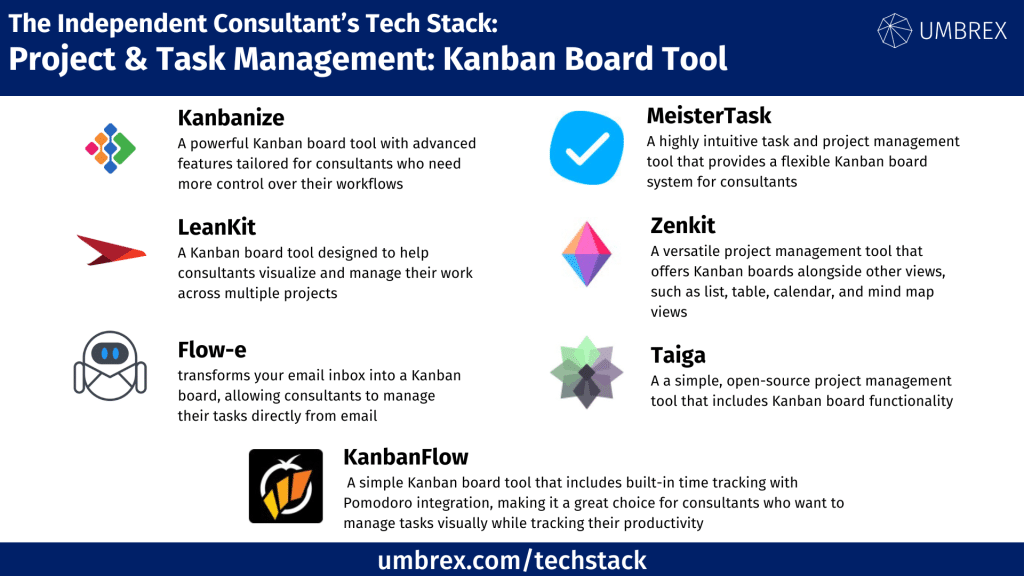
If you would like to suggest a tool to add to this resource, please send us your recommendation.
1. Trello
- Website: www.trello.com
- Form of tool: Web-based platform and mobile app
- Cost: Free plan; Business Class plan starts at $10/month per user
- Geographic coverage: Global
Description and Features:
Trello is a simple yet highly effective Kanban board tool that helps independent consultants visually manage their tasks and projects. Tasks are represented as cards that can be moved between columns on customizable boards. Trello offers integration with many third-party apps through its “Power-Ups,” allowing users to enhance functionality by adding features like time tracking, calendars, and task dependencies.
Key features:
- Drag-and-drop Kanban board functionality
- Customizable task cards with due dates and labels
- Integration with third-party tools via Power-Ups (e.g., Slack, Google Drive, Evernote)
- Collaborative features for sharing boards with clients
Pros and Cons for Independent Consultants:
Pros:
- Simple and intuitive interface that’s easy to learn
- Flexible and customizable boards for different project types
- Free plan is sufficient for most independent consultants
Cons:
- Limited built-in reporting features
- More advanced features like Gantt charts or detailed task dependencies require paid Power-Ups
2. Kanbanize
- Website: www.kanbanize.com
- Form of tool: Web-based platform
- Cost: Paid plans start at $179/month for up to 15 users (solo consultants can contact for pricing)
- Geographic coverage: Global
Description and Features:
Kanbanize is a powerful Kanban board tool with advanced features tailored for consultants who need more control over their workflows. It provides a visual management system that integrates with other project management tools to help consultants manage complex projects. In addition to standard Kanban boards, Kanbanize includes automated workflows, analytics, and timeline views to give consultants deeper insights into project progress and performance.
Key features:
- Customizable Kanban boards with task automation
- Analytics and reporting tools for tracking project performance
- Timeline and portfolio management features
- Integration with tools like Slack, Jira, and Trello
Pros and Cons for Independent Consultants:
Pros:
-
- Excellent for managing complex projects with multiple stages
- Advanced reporting and automation capabilities
- Highly customizable with powerful workflow features
Cons:
-
- Pricing may be prohibitive for solo consultants or small teams
- Overkill for consultants managing smaller or simpler projects
3. LeanKit
- Website: www.planview.com/products/leankit/
- Form of tool: Web-based platform
- Cost: Pricing available upon request (designed for enterprise, but small teams can use)
- Geographic coverage: Global
Description and Features:
LeanKit by Planview is a Kanban board tool designed to help consultants visualize and manage their work across multiple projects. It allows users to create cards and lanes to represent tasks and stages of a project, providing a clear picture of work in progress. LeanKit offers advanced capabilities like process flow visualization, task dependencies, and real-time reporting, making it suitable for consultants who want deeper insights into their project workflows.
Key features:
- Kanban boards with customizable task cards
- Process flow visualization for complex projects
- Task dependencies and real-time project updates
- Integration with tools like Jira and Microsoft Teams
Pros and Cons for Independent Consultants:
Pros:
- Excellent for managing multiple projects with complex workflows
- Real-time reporting and task tracking
- Can scale as a consulting business grows
Cons:
- Pricing and features may be excessive for small consulting practices
- More suitable for consultants working with larger teams or complex projects
4. Monday.com
- Website: www.monday.com
- Form of tool: Web-based platform and mobile app
- Cost: Starts at $8/month per user
- Geographic coverage: Global
Description and Features:
Monday.com is a flexible project management tool with robust Kanban board capabilities. Independent consultants can create boards to organize tasks, set deadlines, and visualize project workflows. Monday.com also offers a variety of other views, such as timeline and calendar views, allowing consultants to switch between different perspectives of their projects. It integrates with many other tools like Slack, Google Drive, and Zapier, making it an excellent choice for consultants who need a versatile, all-in-one solution.
Key features:
- Customizable Kanban boards with task prioritization
- Multiple views, including calendar and timeline
- Integration with third-party tools like Google Drive and Slack
- Automation to streamline repetitive tasks
Pros and Cons for Independent Consultants:
Pros:
- Highly customizable boards for different project needs
- Offers more than just Kanban views (e.g., timeline, calendar)
- Affordable pricing for the range of features available
Cons:
- The learning curve can be steep due to the number of features
- More complex than standalone Kanban board tools
5. Taiga
- Website: www.taiga.io
- Form of tool: Web-based platform
- Cost: Free for public projects; paid plans start at $5/month per user for private projects
- Geographic coverage: Global
Description and Features:
Taiga is a simple, open-source project management tool that includes Kanban board functionality. It is designed to help independent consultants and small teams manage tasks and projects visually. Taiga’s Kanban boards are straightforward and easy to use, making it ideal for consultants who need a no-frills solution to track their project workflow. Taiga also integrates with tools like GitHub, making it a great option for consultants working in development or tech fields.
Key features:
- Simple Kanban board with drag-and-drop functionality
- Open-source and highly customizable
- Integrates with GitHub and other developer tools
- Suitable for consultants managing both public and private projects
Pros and Cons for Independent Consultants:
Pros:
- Free for public projects, making it highly cost-effective
- Simple and user-friendly interface
- Open-source, allowing for customization if needed
Cons:
- Lacks advanced features found in paid Kanban board tools
- Limited support and integrations compared to other tools
6. Flow-e
- Website: www.flow-e.com
- Form of tool: Web-based platform (integrated with email)
- Cost: Free; Pro plan starts at $6/month per user
- Geographic coverage: Global
Description and Features:
Flow-e transforms your email inbox into a Kanban board, allowing consultants to manage their tasks directly from email. It integrates with Gmail and Outlook, converting email conversations into actionable tasks that can be moved across a visual Kanban board. Flow-e is ideal for consultants who want to streamline task management without leaving their inbox. The tool offers due dates, task assignments, and visual timelines, making it easier to track projects that involve a lot of client communication.
Key features:
- Converts email inbox into a Kanban board
- Drag-and-drop task management with due dates and priorities
- Integration with Gmail and Outlook
- Visual timeline for tracking project deadlines
- Task delegation and progress tracking
Pros and Cons for Independent Consultants:
Pros:
- Great for consultants who rely heavily on email for communication
- Seamless email-to-task conversion within the inbox
- Simple and easy to use, no need for external project management software
Cons:
- Limited to email-based task management
- Lacks more advanced project management features like time tracking
7. MeisterTask
- Website: www.meistertask.com
- Form of tool: Web-based platform and mobile app
- Cost: Free plan available; paid plans start at $8.25/month per user
- Geographic coverage: Global
Description and Features:
MeisterTask is a highly intuitive task and project management tool that provides a flexible Kanban board system for consultants. With customizable workflows, task automation, and integrations with popular tools like Slack, Google Drive, and Dropbox, MeisterTask allows consultants to manage projects visually and streamline their processes. The tool offers collaboration features, making it ideal for consultants who work with clients or teams, while automation reduces repetitive tasks.
Key features:
- Customizable Kanban boards with task automation
- Task dependencies, priority setting, and due dates
- Integration with third-party tools like Slack and Google Drive
- Collaboration features for sharing tasks with clients and teams
- Reporting tools and time tracking available in paid plans
Pros and Cons for Independent Consultants:
Pros:
- Intuitive interface with drag-and-drop functionality
- Customizable workflows and task automation
- Great for consultants managing projects with small teams or clients
Cons:
- Limited advanced features in the free plan
- Time tracking only available in paid plans
8. Zenkit
- Website: www.zenkit.com
- Form of tool: Web-based platform, desktop software, and mobile app
- Cost: Free plan available; paid plans start at $9/month per user
- Geographic coverage: Global
Description and Features:
Zenkit is a versatile project management tool that offers Kanban boards alongside other views, such as list, table, calendar, and mind map views. This flexibility allows consultants to manage their tasks in the way that best suits their workflow. Zenkit provides task management, collaboration tools, and customizable workflows, making it ideal for consultants who need both visual task tracking and advanced project management capabilities. It also integrates with tools like Google Drive, Slack, and Microsoft Teams, making collaboration easy.
Key features:
- Kanban boards with customizable task views (list, calendar, etc.)
- Task management with deadlines, dependencies, and labels
- Real-time collaboration and file sharing
- Integration with third-party tools like Google Drive and Slack
- Reporting and workload management features in paid plans
Pros and Cons for Independent Consultants:
Pros:
- Highly flexible with multiple task views
- Strong collaboration features, ideal for consultants working with clients
- Free plan with robust features
Cons:
- May be overwhelming for those looking for a simple Kanban tool
- Advanced features (e.g., workload management) require a paid plan
9. KanbanFlow
- Website: www.kanbanflow.com
- Form of tool: Web-based platform
- Cost: Free plan; Premium plan starts at $5/month per user
- Geographic coverage: Global
Description and Features:
KanbanFlow is a simple Kanban board tool that includes built-in time tracking with Pomodoro integration, making it a great choice for consultants who want to manage tasks visually while tracking their productivity. Consultants can set up tasks, assign deadlines, and monitor task progress in real time. The time tracking feature is especially useful for consultants who bill by the hour or want to optimize their productivity using the Pomodoro technique.
Key features:
- Simple Kanban boards with drag-and-drop functionality
- Built-in time tracking with Pomodoro integration
- Task dependencies and sub-tasks for detailed project management
- Customizable workflow columns
- Integration with third-party tools like Google Drive and Dropbox
Pros and Cons for Independent Consultants:
Pros:
- Simple, intuitive Kanban board with time tracking
- Great for consultants who want to monitor productivity with Pomodoro
- Affordable pricing with useful features even in the free plan
Cons:
- Lacks advanced project management features (e.g., Gantt charts, resource management)
- Not ideal for managing large or complex projects