

4.2 Simple bar chart

The simple bar chart is your default option for cross-section comparisons. One measure, one bar per category, all in the same unit.
Typical uses include: top 10 markets by revenue, cost per unit by plant, NPS by channel, or headcount by function. The logic is straightforward: each bar length encodes the value; the reader’s eye compares lengths to see ranking and relative gaps.
To make a strong simple bar chart:
- Order categories by value, not alphabetically, unless there is a natural sequence (e.g., stages of a process). Sorting from largest to smallest focuses attention on the leaders and the long tail.
- Use a zero baseline on the axis. This preserves honest length comparisons.
- Keep the number of bars reasonable. As a rule of thumb, once you exceed about 10–12 bars, the chart starts to feel dense. For longer lists, show the top subset on the main page and park the full table in the appendix.
- Label bars cleanly, ideally with direct data labels at the end of the bar for the key figure (e.g., “$42M”), and avoid forcing the reader to track back to the axis for every value.
A simple bar chart should feel almost boring—in a good way. If it is visually busy or hard to read, you have probably added more than you need.
4.3 Clustered bar chart (comparing multiple series within each category)
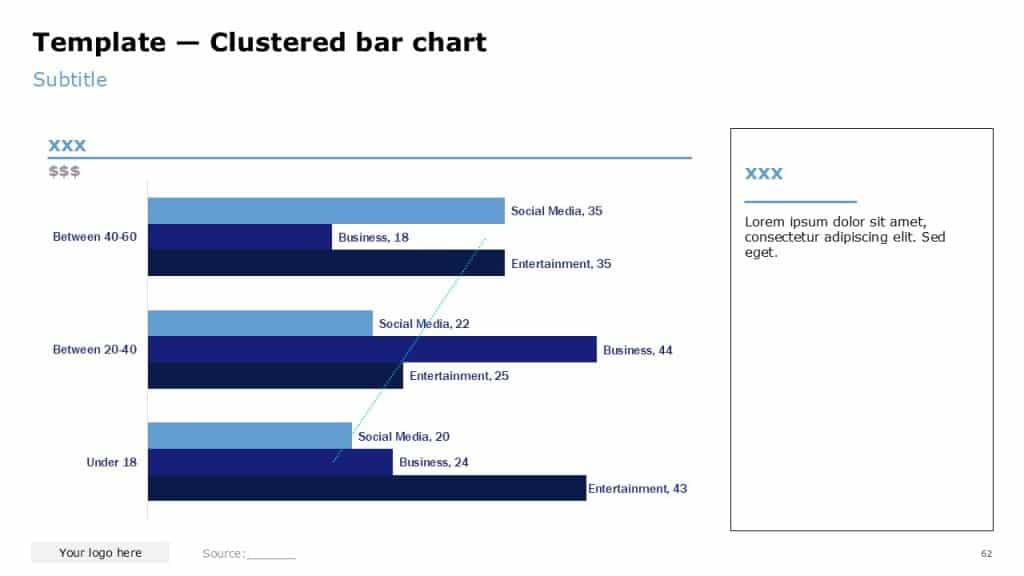
A clustered bar chart compares multiple series within each category. For example, revenue by country with separate bars for “Client” vs “Benchmark,” or satisfaction by channel with “Current” vs “Last year” side by side.
Clustered bars are helpful when the question is not just “who is largest?” but “how do two (or at most three) measures compare within each category?”
Good use cases:
- Client vs main competitor, by market.
- Before vs after a change, by segment.
- Planned vs actual, by function.
Design guidelines:
- Limit yourself to two, at most three, series per cluster. Beyond that, it becomes hard to distinguish bars, even with distinct colors or patterns.
- Use a consistent color convention across the deck (e.g., dark for client, light gray for benchmark).
- Still sort categories by one anchor series (usually the client or total) to maintain a clear sense of ranking.
- Place a simple legend or, better, use clear direct labels or subtle patterns so the viewer immediately knows which bar is which.
If you find that the viewer needs to keep flicking between legend and chart to decode which bar is which, you either need clearer labeling or a simpler structure.
4.4 Stacked bar chart (absolute contributions)

Stacked bar charts show how a total for each category is composed of multiple components in absolute terms. Each bar still has an overall height (or length) representing the total, but that bar is divided into colored segments, each representing a component.
Typical uses:
- Total cost by business unit, split into categories (labor, materials, overhead).
- Total revenue by channel, split into product lines.
- Total headcount by region, split into roles.
You use a stacked bar chart when you want to answer both:
- “How big is each category overall?” and
- “What are the major components within each category?”
Design considerations:
- Use stacked bars when both the total and the components matter. If you only care about the mix, a 100% stacked variant may be better.
- Keep the number of components modest—3 to 5 is usually the upper limit for clarity.
- Recognize that components not starting from the baseline are harder to compare across categories. If comparing one particular component across categories is the main story, a clustered bar or a separate simple bar chart may be clearer.
Think of stacked bars as composition charts with a secondary ranking dimension. They are powerful but can quickly become cluttered if you try to carry too many series.
4.5 100% stacked bar chart (relative mix at 100%)

A 100% stacked bar chart normalizes each bar to a common total (100%) and shows how that total is split among components. You lose information about absolute size but gain a cleaner view of relative mix.
Use this when the share or percentage breakdown is more important than the raw level:
- Revenue mix by segment for different countries.
- Customer age mix by channel.
- Product portfolio composition over time.
Key guidelines:
- Make sure viewers understand that bar lengths are identical; all the information is in the segment proportions, not total size. The axis and/or title should explicitly reference percentages.
- Again, limit to a small number of components. When you get beyond 5–6, the thinner segments become very hard to compare visually.
- Consider pairing with a separate chart (or a small table) that shows absolute totals per category, especially if size still matters to the decision.
A 100% stacked bar is often the best way to tell a “mix shift” story in a single glance, particularly when combined with clear highlighting of the components that are growing or shrinking.
4.6 Waterfall bar chart (bridging from one value to another)

A waterfall bar chart (in horizontal form) is a special case of bar charts used to bridge from a starting value to an ending value via intermediate drivers. While more commonly seen in vertical form, the logic is identical: one starting bar, a sequence of positive and negative bars, and a final ending bar.
Typical uses:
- Profit bridge from prior year to current year, broken down by volume, price, mix, FX, and costs.
- Cost savings from baseline to target after initiatives.
- Headcount movement from starting to ending period (hires, leavers, transfers).
In a horizontal waterfall:
- The first bar represents the starting point.
- Each subsequent bar adds (positive) or subtracts (negative) from that level.
- The final bar is the resulting total after all steps.
Good practice:
- Use distinct visual treatment (e.g., neutral color for base and final, one color for positive steps, another for negative).
- Clearly label each step with both its name (“Price effect”) and value (“+10”).
- Keep the number of steps manageable—too many small steps will dilute the story. Aggregate minor items into “Other” where appropriate.
Waterfalls are some of the most interpretive bar charts you will build, and they should always be tightly tied to the narrative: “Here is exactly how we got from A to B.”
4.7 “Bar chart with words” (bars as visual emphasis for qualitative scales)

Sometimes your underlying data are qualitative or ordinal rather than strictly numeric: perceived risk levels, readiness scores, self-assessed maturity, or priority ranks. In these cases, you can still use horizontal bars as a visual emphasis tool, even if the axis is implicit.
Examples include:
- A slide listing initiatives with bars indicating implementation progress (e.g., 0–100% completion).
- A risk register where each risk line has a bar showing relative severity or likelihood.
- A capability assessment where functions are rated from 1 to 5 and shown as bars rather than just numbers.
Guidelines:
- Be honest about relative lengths: even if the data are more judgment-based, keep bar lengths approximately proportional to the underlying scale.
- Usually you will omit a full numeric axis, relying instead on labels at the bar ends (“Low,” “Medium,” “High,” or “3/5”).
- Treat these visuals as supporting devices, not analytical centrepieces—the main message should still come from your title and text.
Think of “bar charts with words” as halfway between a chart and formatted text: they make qualitative comparisons immediately visible without pretending to be more precise than the underlying data justify.
